













A milestone-tracked Key Result lets you assign an incremental progress weight to each milestone inside a KR, so a result that would otherwise read 0% or 100% shows real progress at every completed stage.
Table of Contents
What Is a Milestone-Tracked Key Result?
A milestone-tracked Key Result breaks a binary outcome, one that would otherwise only register 0% or 100%, into a sequence of milestones. Each milestone carries its own incremental percentage weight, and the weights together account for the Key Result's full progress.
As each milestone is marked achieved, the Key Result's overall progress moves by that milestone's assigned weight, giving you a running read on completion instead of a single pass or fail outcome.
Note
This Key Result type is built for outcomes with more than one completion point. If your Key Result has just one milestone, use a percent tracked Key Result instead.
Why Does a Milestone-Tracked Key Result Matter?
A Key Result like "Launch product version 2.0" has only two states: launched or not launched. Reported on its own, it sits at 0% for the entire cycle and only jumps to 100% the moment it ships, leaving no visibility into how much work is actually done.
Milestone tracking replaces that single jump with a running total. Each stage completed, such as finishing development or completing QA, moves the Key Result's reported progress, so reviewers see real movement throughout the cycle instead of a late surprise.
How Does a Milestone-Tracked Key Result Work?
Step 1: Identify the Binary Outcome
Start from a Key Result that would otherwise report only 0% or 100%, such as a product launch.
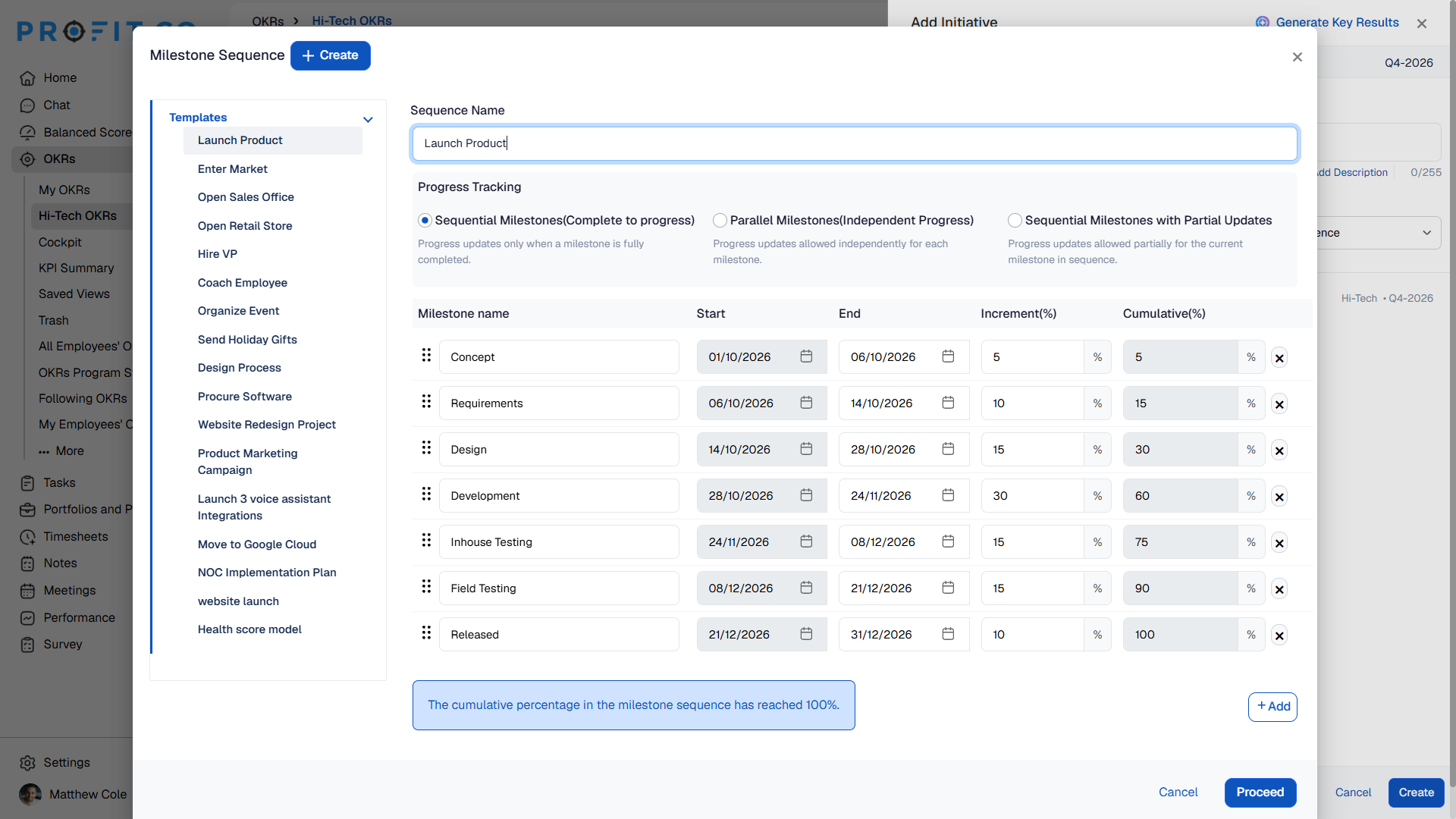
Step 2: Break the Outcome Into Milestones
Divide the work into a sequence of discrete milestones, each representing a meaningful stage toward completion.
Step 3: Assign an Incremental Weight to Each Milestone
Give each milestone its own percentage weight. The weights across the full sequence add up to the Key Result's total progress.
Step 4: Mark Milestones Achieved as Work Progresses
Mark each milestone achieved as it is completed. The Key Result's overall progress updates by that milestone's assigned weight.
What Are the Best Practices for a Milestone-Tracked Key Result?
- Weight milestones by actual completion value, not evenly by count, since a later milestone such as a full launch typically represents more finished work than an early milestone such as drafting a spec.
- Confirm milestone weights add up to the Key Result's intended full progress before logging any check-ins, since overall progress is calculated directly from the weights you assign.
- Keep milestone definitions fixed once the review period begins, so the progress reported at the end of the cycle reflects the same breakdown used throughout.
- Define milestones as distinct, verifiable stages rather than vague checkpoints, since each one marked achieved moves the Key Result's reported progress on its own.
Related Articles
- How do you define a key result of Milestone tracked in Profit?
- What is a Sequential milestone with Partial updates in milestone-tracked Key Results, and how does it work?
What Are Some Frequently Asked Questions About Milestone-Tracked Key Results?
No. Each milestone is assigned its own incremental weight, so a major stage can count for more progress than a smaller one as long as the full sequence adds up correctly.
The Key Result reaches 100% progress, since the combined incremental weights of every milestone account for the Key Result's full outcome.
No. Milestone tracking depends on a defined sequence of milestones with assigned weights. Without at least one milestone, there is no incremental weight to calculate progress from.
Execute your strategy with confidence
Connect OKRs, tasks, and teams in one place with Profit.co
