

Admins can choose which OKR view format, such as List, Gantt, or Bowler Chart, loads first when users open the OKRs module, instead of every session starting on List view. Users can still switch to any other enabled view at any time.
Table of Contents
- What is Default Landing View for OKRs?
- Why Does Default Landing View for OKRs Matter?
- How Does Default Landing View for OKRs Work?
- What Happens When You Use Default Landing View for OKRs?
- What Are the Best Practices for Default Landing View for OKRs?
- Related Articles
- What Are Some Frequently Asked Questions About Default Landing View for OKRs?
What is Default Landing View for OKRs?
Default Landing View for OKRs is an admin-level setting that controls which of the eight available OKR view formats — List, Gantt, Canvas, Alignments, Status Map, Heatmap, Hierarchy, or Bowler Chart — loads first when users open the OKRs module. It's configured once for the organization, not as an individual user preference.
List view remains the fallback for any page that doesn't include the selected default view, or for a user who can't access it. Users retain the ability to switch to any other enabled view from within OKRs at any time.
Why Does Default Landing View for OKRs Matter?
Every user previously landed on List view first, then manually switched to whichever format their team actually used for reviews, such as Bowler Chart for Plan/Actual tracking. Setting the default landing view removes that repeated switch from every session.
Because the setting applies once at the admin level, standardizing on a shared view no longer depends on training reminders or written instructions repeated to each new hire.
How Does Default Landing View for OKRs Work?
Prerequisite: You must have Admin access to configure the default landing view for OKRs.
Step 1: Open List Layout Settings
- Navigate to Settings → OKRs → Views from the left navigation panel.
- Switch to the List Layout tab.
Step 2: Set the Default Landing View
- Use the Default landing view dropdown in the top right to select which view loads first.
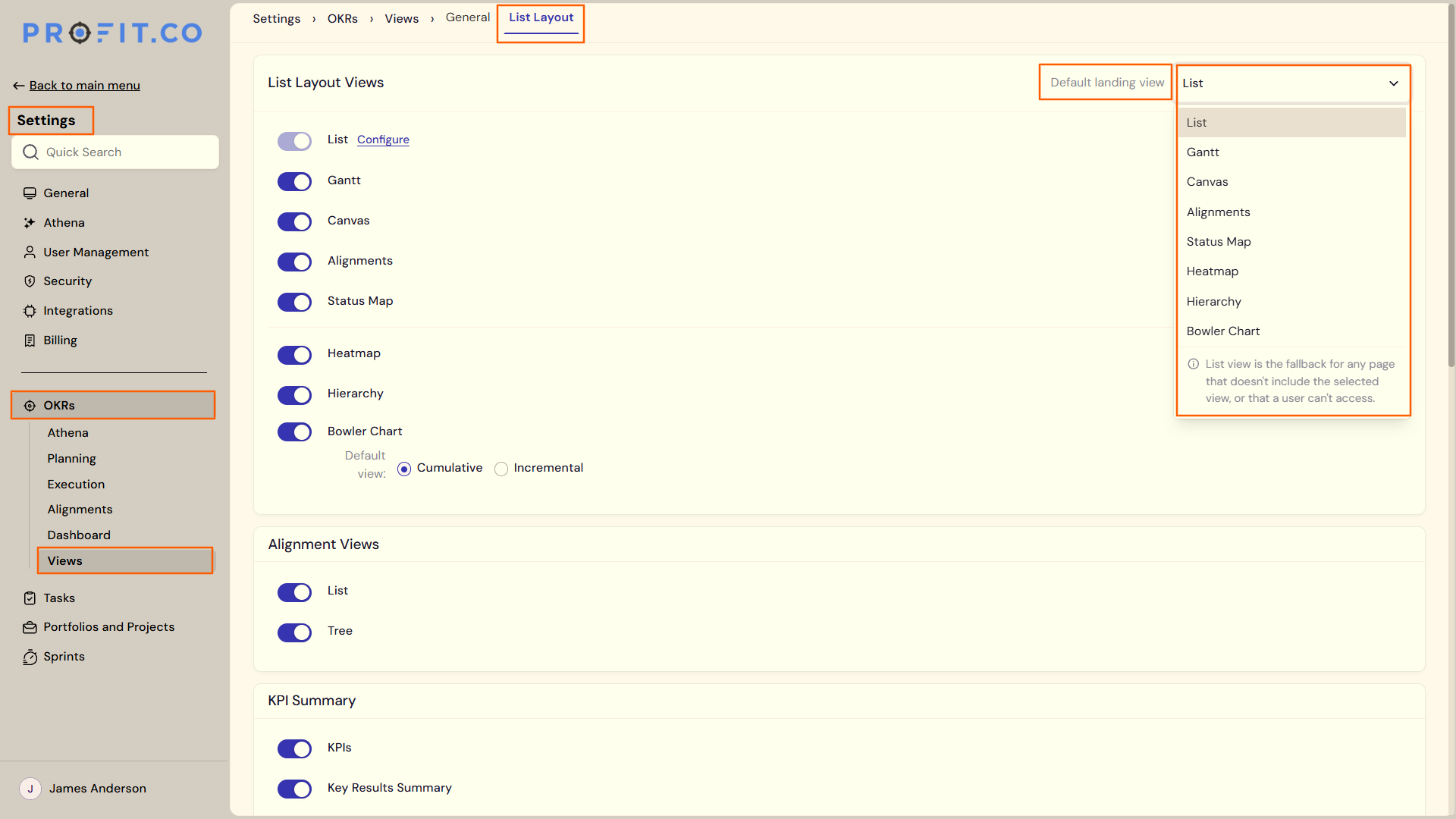
Note
1. Only views toggled on in this list appear as selectable options in the Default landing view dropdown above.
2. List view is the fallback for any page that doesn't include the selected view, or that a user can't access.
What Happens When You Use Default Landing View for OKRs?
| Scenario | What Happens |
|---|---|
| You set a view, such as Bowler Chart, as the default landing view. | Profit.co loads that view first for every user who opens the OKRs module, replacing the previous List view start point. |
| You open a page that doesn't include the selected default view. | Profit.co falls back to List view on that page instead of failing to load. |
| You don't have access to the selected default view. | Profit.co falls back to List view for you instead of blocking your access to OKRs. |
| You toggle off the view currently set as the default landing view. | Profit.co falls back to List view for everyone instead of leaving the default landing view unavailable. |
| You switch to a different view during a session. | Profit.co keeps that view open for the rest of the session and loads the default landing view again the next time you open OKRs. |
What Are the Best Practices for Default Landing View for OKRs?
- Match the default to the view your team already uses for reviews, such as Bowler Chart for Plan/Actual tracking, rather than defaulting to List by habit.
- Review which views are toggled on in the list below before choosing a default, so your selection reflects a format your team can actually reach.
- Communicate the change to your team before rolling it out, since every user's next session opens directly on the new default view.
- Keep List view toggled on even if you choose a different default, since it's the fallback for any page or user that can't reach your chosen view.
Related Articles
- What is the use of the "OKRs list view" option on the OKRs settings page in Profit.co?
- How do I enable and use the status map view in Profit.co?
What Are Some Frequently Asked Questions About Default Landing View for OKRs?
Organization-wide. Admins configure one default landing view that applies to everyone who opens the OKRs module, not a personal per-user preference.
No. It only changes which view loads first when OKRs opens; it doesn't touch any OKR's progress, status, or other data.
Admins configure it from Settings → OKRs → Views → List Layout. It isn't a setting individual users can change for themselves.
Execute your strategy with confidence
Connect OKRs, tasks, and teams in one place with Profit.co
