

Profit.co calculates project progress from milestone and task completion, and one account-level control decides whether project members can replace that figure with a percentage they enter themselves at check-in.
Table of Contents
What is Allow Manual Progress Updates?
Allow Manual Progress Updates is a toggle that decides whether the Disable automatic progress updates checkbox appears on a project's Check-in panel. It ships switched off, and a separate toggle with the same name governs milestones.
| Control | Settings Section | Who Can Override Progress When On |
|---|---|---|
| Project level | Project Progress & Weighting | Users on an assigned project |
| Milestone level | Milestone Progress & Weighting | Milestone owners |
How Does Allow Manual Progress Updates Work?
Prerequisite: Only super users can change this setting. Project members can use the override only after it is turned on.
Step 1
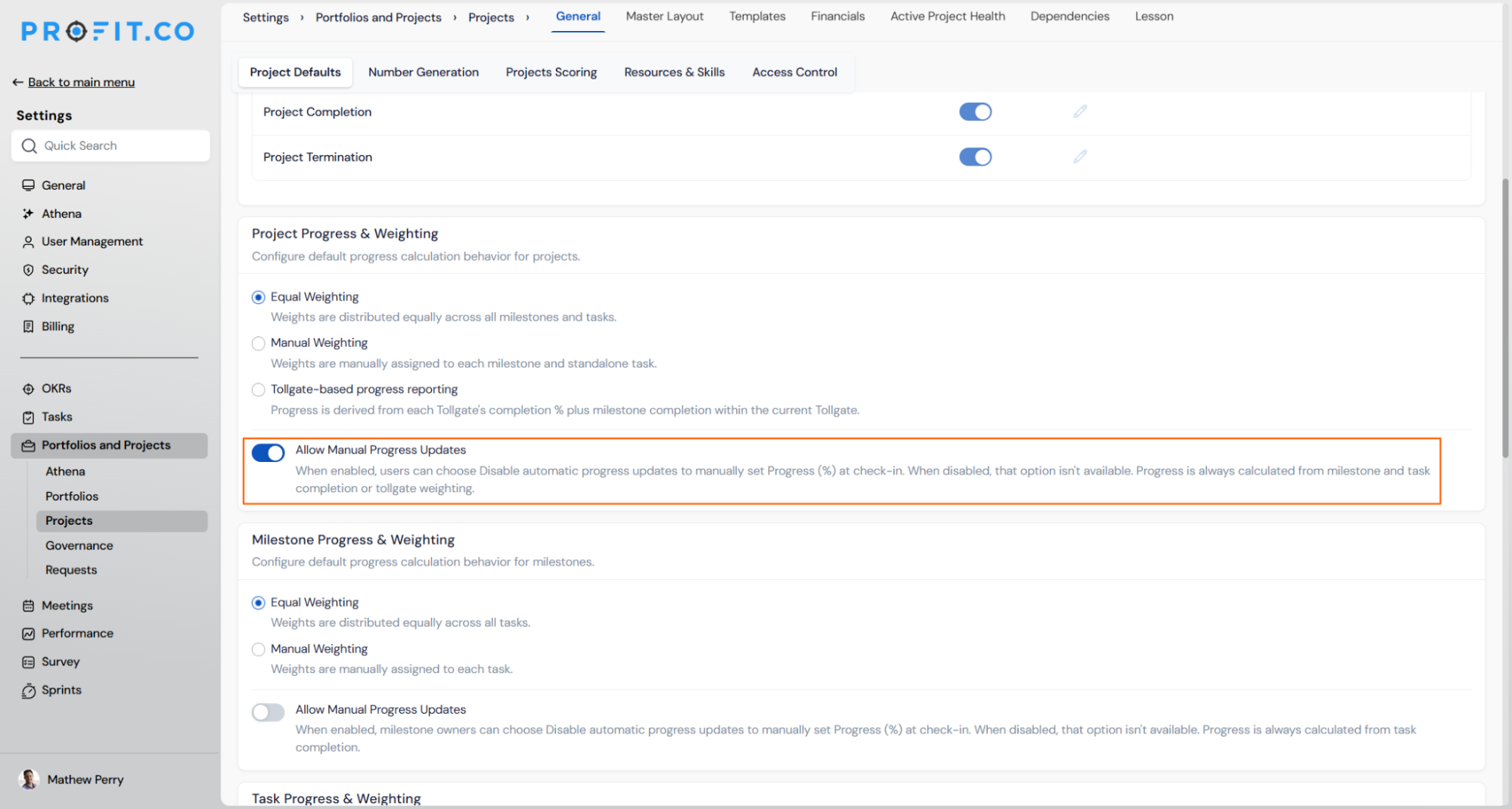
- Go to Settings → Portfolios and Projects → Projects.
- Open the General tab, then the Project Defaults sub-tab.
- Scroll to the Project Progress & Weighting section.
- Switch on the Allow Manual Progress Updates toggle.
Step 2
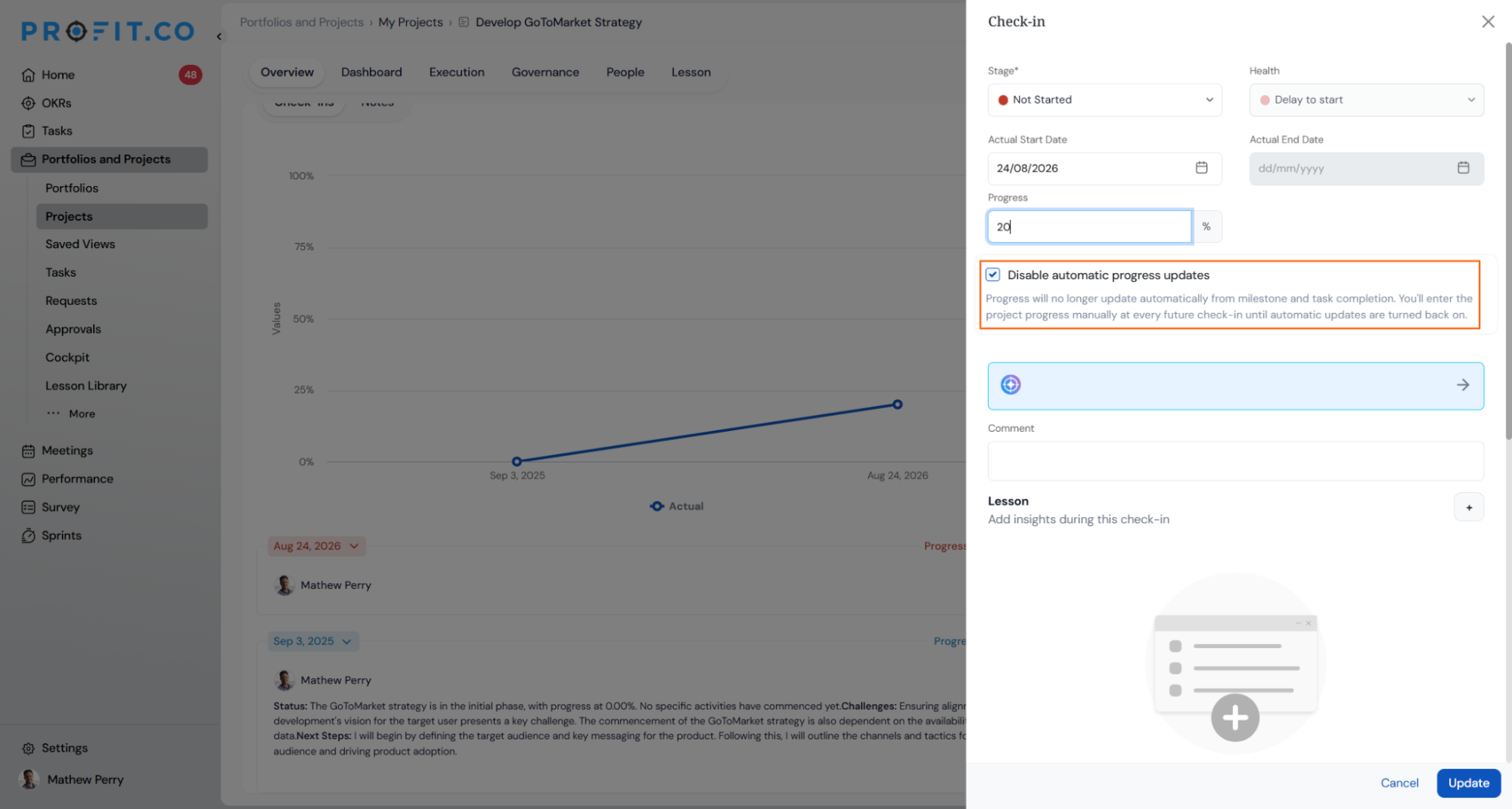
- Open the project and launch its Check-in panel.
- Select Disable automatic progress updates.
- Enter a value in Progress (%) and click Update.
What Happens When You Use Allow Manual Progress Updates?
| Scenario | What Happens |
|---|---|
| You check in on a project while the setting is off. | Profit.co calculates progress and stage from milestone and task completion, or from tollgate weighting when it is configured. |
| You turn the setting on. | Profit.co adds the Disable automatic progress updates checkbox to the Check-in panel for users on assigned projects. |
| You select Disable automatic progress updates during a check-in. | Profit.co stops updating that project's progress from milestone and task completion until someone turns automatic updates back on. |
| You leave the setting off when this change is deployed. | Profit.co reverts every project that previously had automatic updates disabled to automatic calculation. |
| You check in on a reverted project for the first time. | Profit.co recalculates that project's progress from milestone and task completion at that check-in. |
| You turn the setting off after projects have started using manual progress. | Profit.co keeps the manually set progress value on those projects. |
What Are the Best Practices for Allow Manual Progress Updates?
- Decide before the release whether any team depends on manual overrides, and turn the setting on ahead of deployment if one does, so existing overrides are not reverted.
- Before switching the setting off later, ask owners of manually tracked projects to re-enable automatic updates, because turning it off leaves their hand-entered values in place.
- Warn owners of reverted projects that their figure will change at the next check-in, so a sudden jump or drop is not reported as a data error.
- Confirm tollgate weighting is set up on projects using Tollgate-based progress reporting, since automatic progress on those projects comes from tollgate completion rather than raw milestone counts.
- Set the milestone-level toggle as its own decision, because it sits in a different section and does not follow the project-level toggle.
Related Articles
What Are Some Frequently Asked Questions About Allow Manual Progress Updates?
No. The toggle lives under Project Defaults in Settings and applies to every project in your account, not to individual projects.
No. Every project keeps calculating automatically until someone selects Disable automatic progress updates during a check-in.
No. Equal Weighting, Manual Weighting, and Tollgate-based progress reporting are separate options in the same section, and automatic calculation follows whichever one is selected.
Execute your strategy with confidence
Connect OKRs, tasks, and teams in one place with Profit.co
