

Project Dependency Management lets you formally link two projects so that one project's completion status governs when the other can proceed. It gives project and portfolio teams a single, visual record of which projects are blocking or waiting on each other.
Table of Contents
What is Project Dependency Management?
Project Dependency Management is a Portfolios and Projects capability that records a Finish-to-Start relationship between two projects using a Predecessor and Successor pairing. Each link carries an assigned owner and a written description, and appears as a Blocking or Waiting On connection on the Dependency Map.
The feature currently covers project-to-project dependencies only, with Finish-to-Start as the relationship type shown in the Add Dependency dialog. Sequencing at the task or Key Result level is handled by Profit.co's separate Task Dependency and OKR Dependency features.
Note
Project Dependencies link two entire projects. To sequence individual tasks or milestones within a project, use Task Dependencies from the Tasks module instead.
Definition of Project Management Dependencies
Dependencies describe how tasks rely on / impact other tasks. They dictate when tasks can start or finish based on preceding work. Common terminology used to describe a dependency in project management includes:
- Predecessor: the task that must occur first.
- Successor: the task waiting for the predecessor.
Why Project Dependency Management Matters
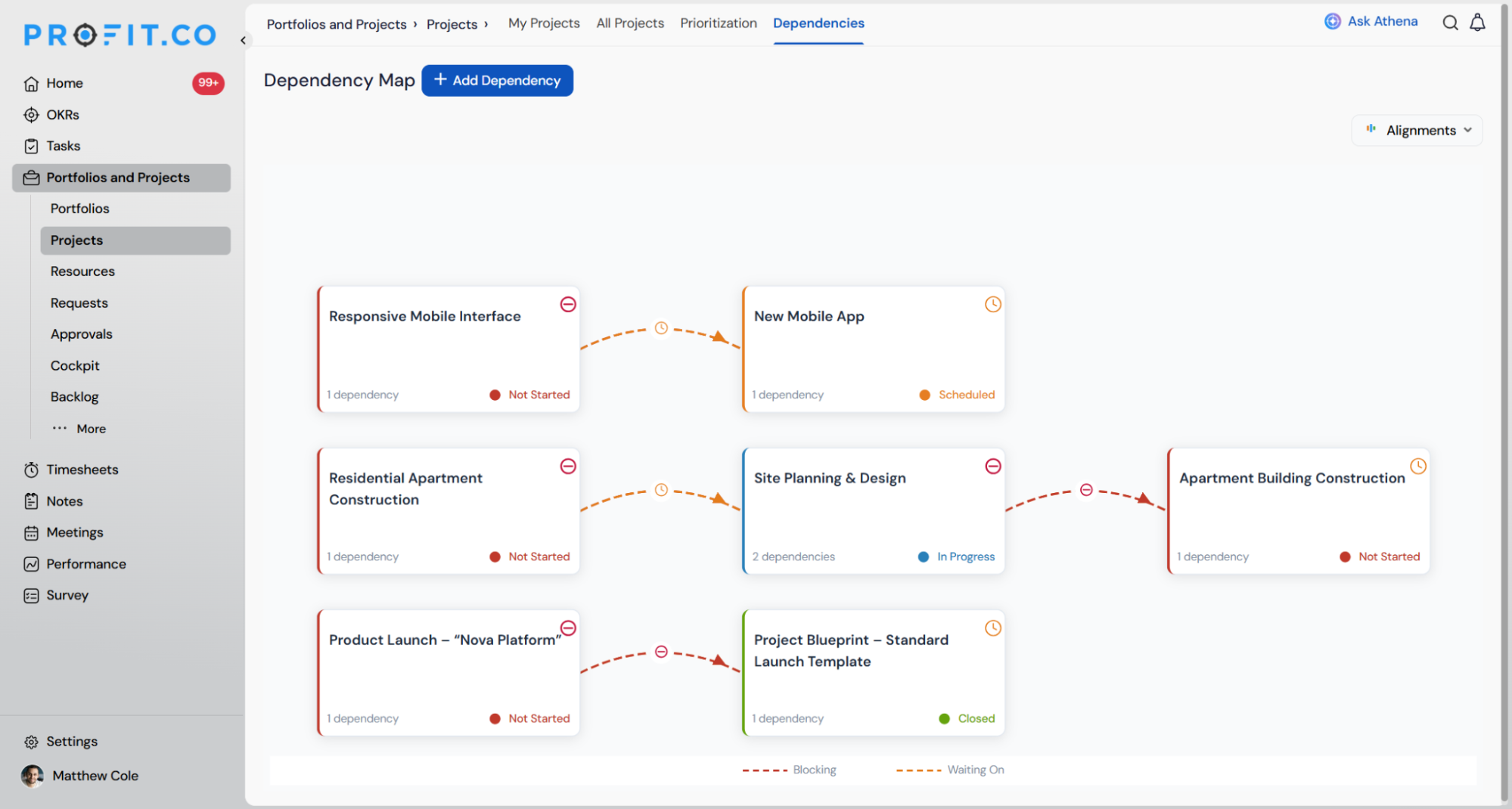
Before this link existed, confirming whether a prerequisite project had actually finished meant opening that project directly or checking in with its owner. Project Dependency Management puts that status on the Dependency Map itself, so a Successor project's team can see the Predecessor's standing without leaving the portfolio view.
The dependency count on each project card also gives portfolio managers a fast read on how interconnected a project is, useful when prioritising which projects to review first during a portfolio-wide schedule check.
Types of Project Dependencies
Understanding the different types of project dependencies enables project managers to choose the appropriate sequencing logic and identify risks during planning.
Logical Relationships (FS, SS, FF, SF)
These relationships define how tasks interact in a schedule.
Finish to Start (FS)
The most common relationship. The successor cannot start until the predecessor finishes.
Start to Start (SS)
Both tasks start at the same time, or the successor starts after the predecessor begins.
Finish to Finish (FF)
Both tasks finish at the same time, or the successor finishes after the predecessor.
Start to Finish (SF)
Rare but useful for workflows where one task cannot finish until another starts.
How It Works (Step-by-Step Guide)
Step 1
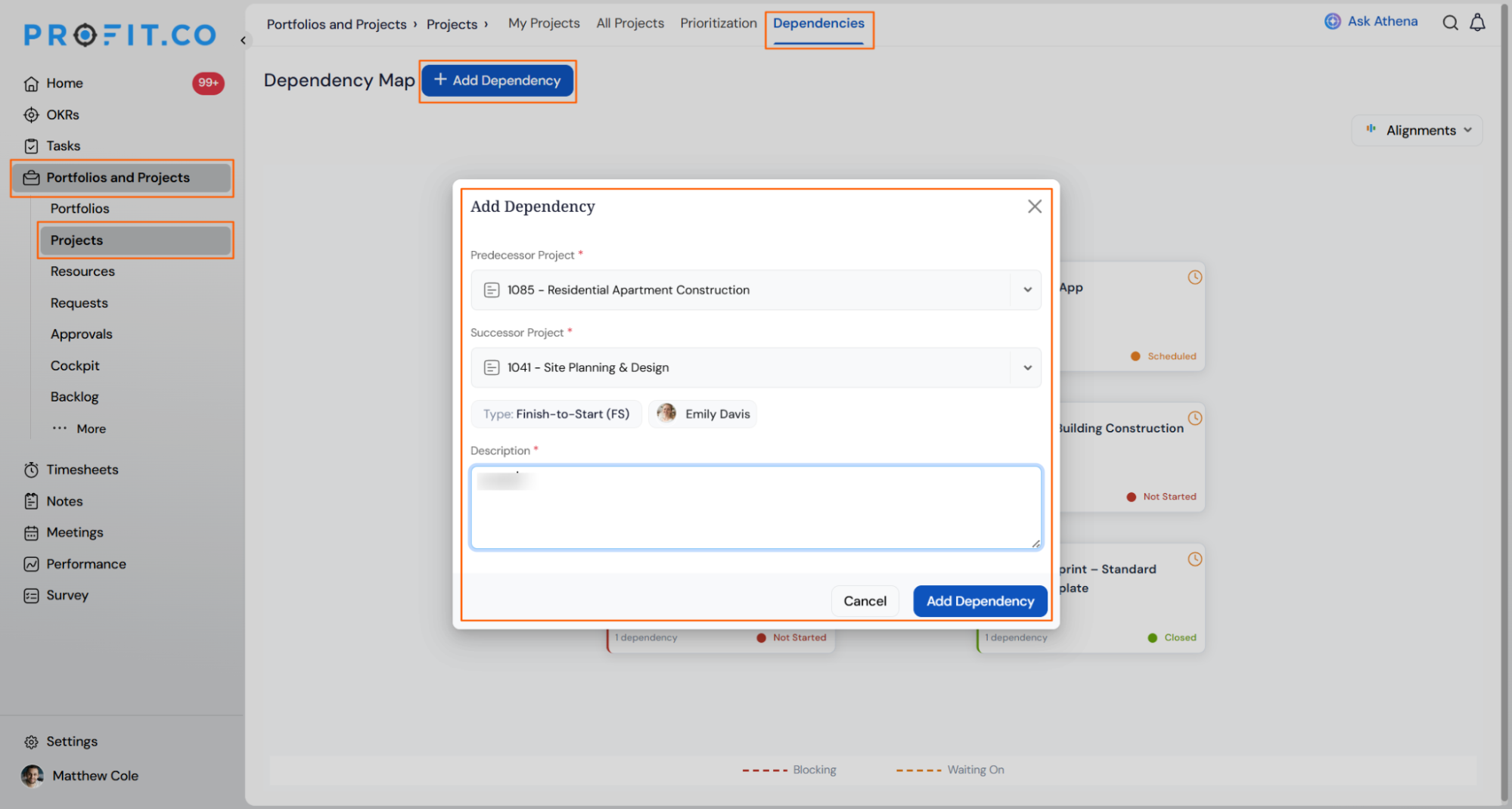
- Navigate to Portfolios and Projects → Projects → Dependencies.
- Click + Add Dependency on the Dependency Map page.
- The Add Dependency dialog opens with empty Predecessor and Successor fields.
- Choose the project that must finish first from the Predecessor Project dropdown.
- Choose the project that depends on it from the Successor Project dropdown.
- Confirm the relationship Type.
- Click Add Owner(s) and select who is accountable for the dependency.
- Enter a Description explaining why the two projects are linked.
- Click Add Dependency to confirm and create the link.
Other Ways to Start a Dependency
Profit.co opens the same Add Dependency dialog from two additional entry points, each pre-filling part of the form:
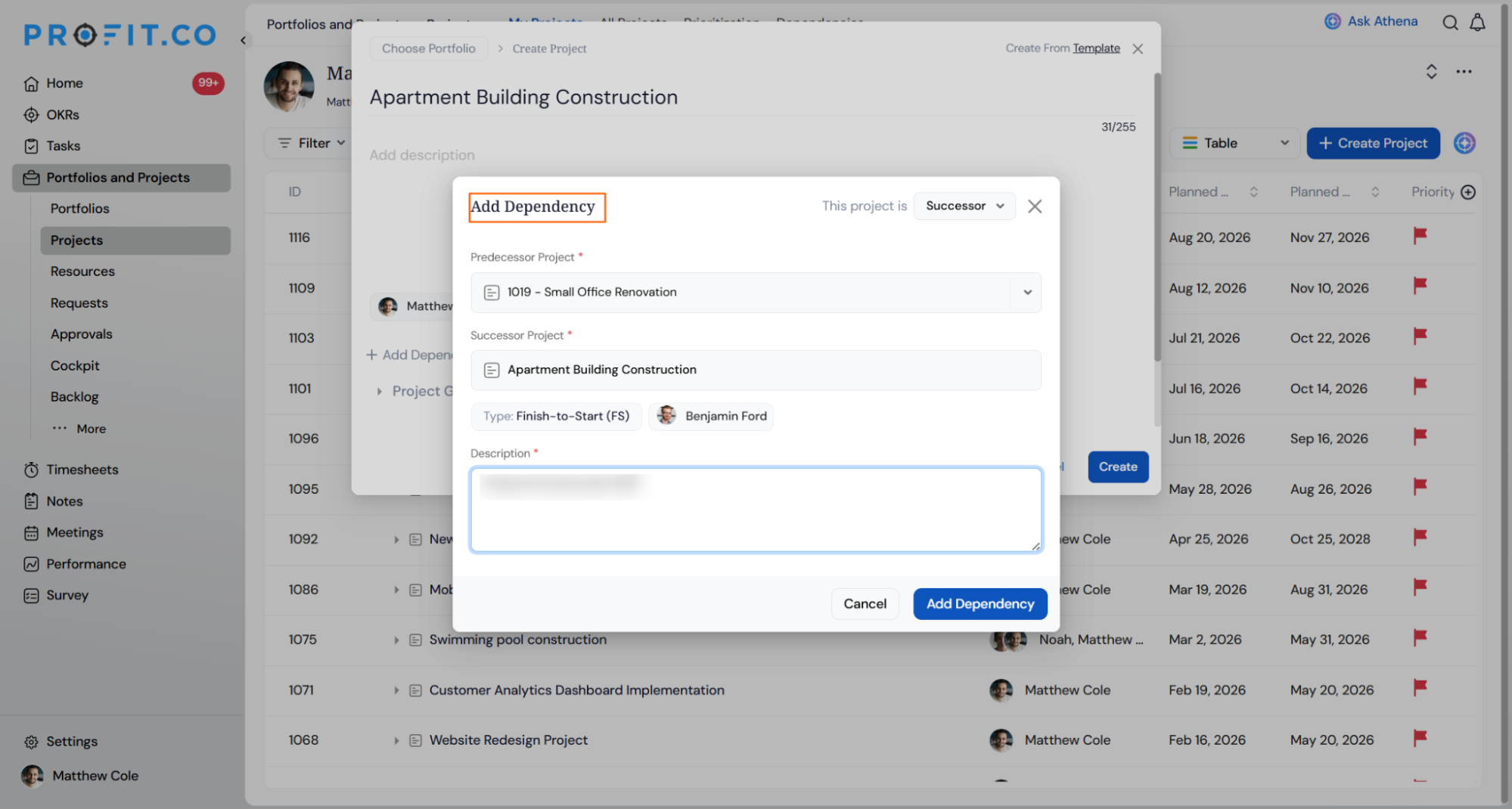
- While creating a new project, use the + Add Dependency option on the Create Project screen. The new project is set as the Successor by default, with a This project is toggle to switch it to Predecessor.
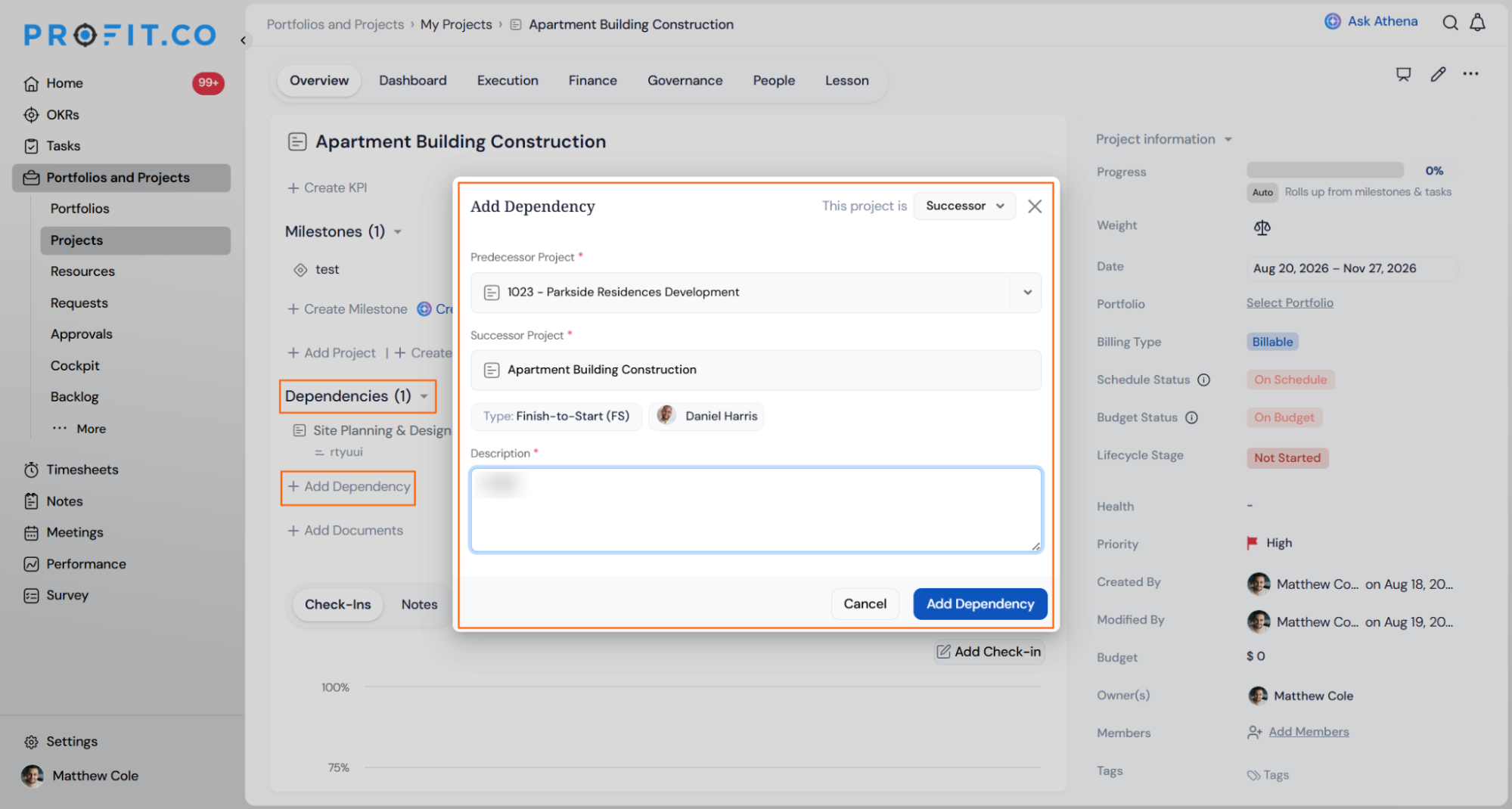
- From an existing project's Overview page, open the Dependencies section and click + Add Dependency; the current project is pre-filled as the Successor Project.
Tip
Starting from a project's Overview page pre-fills that project as the Successor, saving you a dropdown selection when you already know which project depends on it.
Project Dependency Management Scenarios and Their Outcomes
The steps above cover how to create a link. The table below covers what happens to notifications, visibility, and the link itself once you do.
| Scenario | What Happens |
|---|---|
| You add a dependency and click Add Dependency to save it. | Profit.co sends a notification to the dependency's Owner(s) and to the owners and members of both the Predecessor and Successor projects. |
| You open the Dependency Map after saving a dependency. | Profit.co displays a connector between the two project cards, labelled Blocking on the Predecessor side and Waiting On on the Successor side. |
| You add a dependency from a project's Overview page or during project creation. | Profit.co lists the link under that project's Dependencies section and updates the dependency count shown on both linked project cards. |
| You edit or remove an existing dependency. | Profit.co updates the Blocking and Waiting On status on the Dependency Map immediately, with no separate confirmation step. |
| You close the Add Dependency dialog by clicking Cancel before saving. | Profit.co discards the entered Predecessor, Successor, Owner, and Description values, and no dependency is created. |
Best Practices for Project Dependency Management
- Assign an Owner who can actually resolve delays on the Predecessor side, since owners are the first point of contact once Profit.co notifies both projects' teams of the link.
- Use the Description field to record why the dependency exists, for example a shared resource or a sequential deliverable, so anyone reviewing the Dependency Map later understands the link without contacting the owner.
- Add dependencies from a project's Overview page when you already know which project is downstream. It pre-fills the Successor field and skips a dropdown selection.
- Check the Blocking and Waiting On connectors on the Dependency Map, not just the dependency count on a project card, since the count alone doesn't show which side of the relationship that project sits on.
- Remove dependencies as soon as they are no longer relevant. Since edits and removals update the map immediately, an outdated link can mislead a portfolio review just as easily as a missing one.
Related Articles
- What are Task Dependencies in Profit.co, and how do they help manage project execution?
- How to create a Project in the PPM module?
- How to add members to a project in the PPM module?
Frequently Asked Questions
No. It links whole projects using the Predecessor and Successor model only; task-level sequencing is handled by the separate Task Dependency feature.
Yes, based on the current Add Dependency dialog, Finish-to-Start (FS) is the relationship type shown when linking two projects.
The project card in views such as My Projects and the Dependency Map shows a dependency count, for example "1 dependency", next to the project name.
Execute your strategy with confidence
Connect OKRs, tasks, and teams in one place with Profit.co
