

Upward Assessment lets direct reports formally evaluate their managers as a step within Profit.co's structured performance review cycles. Their responses feed directly into the manager's overall rating and competency scores.
Table of Contents
What is Upward Assessment?
Upward Assessment is a review step that Super Users enable within a review template's Review Process configuration, alongside Self, Peer, Manager, and other assessment types. It captures structured feedback from a manager's direct reports and lets administrators control anonymization and question visibility independently of every other assessment type in the template.
Upward Assessment applies per review template. Enabling it on the Standard Review template does not activate it on any other template, so each template's Review Process configuration determines whether upward feedback is collected for that review cycle.
Note
Upward Assessment's participant type is fixed to Direct Reports and cannot be swapped for a custom list, unlike Peer Assessment, which supports selecting a Custom List of participants.
Why Upward Assessment Matters
Manager evaluation from direct reports previously required separate survey tools or manual collection outside the review cycle. Upward Assessment brings that feedback into the same structured process HR already uses for self, peer, and manager assessments.
| Benefit | What Changes |
|---|---|
| Consolidated feedback loop | Direct reports evaluate managers inside the same review cycle instead of relying on separate survey tools or manual collection. |
| Candid responses | Anonymizing individual responses lets subordinates rate managers honestly without their identity being tied to specific answers. |
| Single point of oversight for HR | Upward Assessment follows the same initiation, Cockpit tracking, activity log, and reopen controls as every other review step, so HR manages it from the same place as the rest of the cycle. |
How It Works
Configure Upward Assessment (Super User)
Step 1
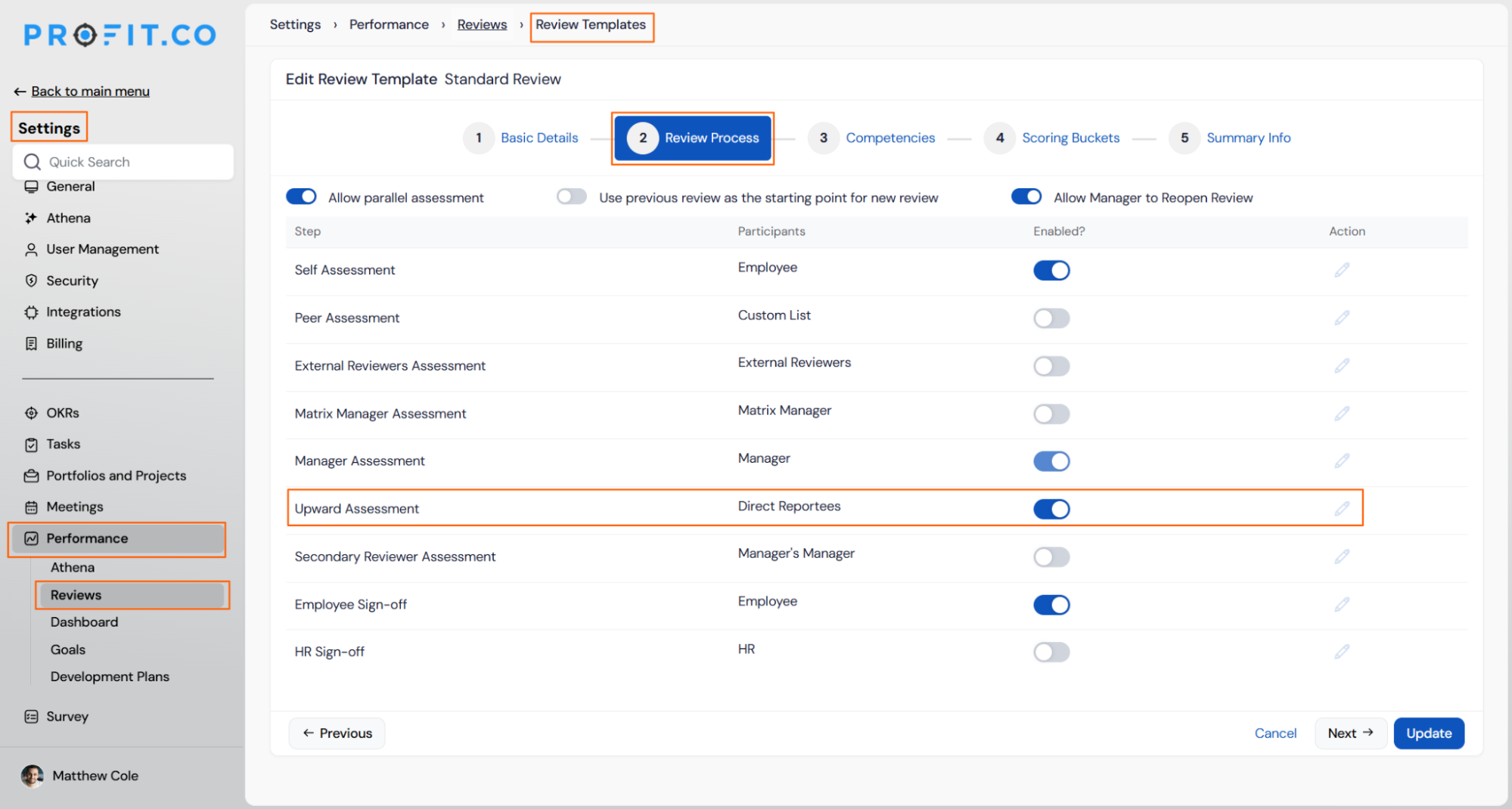
- Navigate to Settings → Performance → Reviews → Review Templates.
- Select a review template.
- Open the Review Process tab.
- Toggle Upward Assessment on to activate subordinate-to-manager reviews for the template.
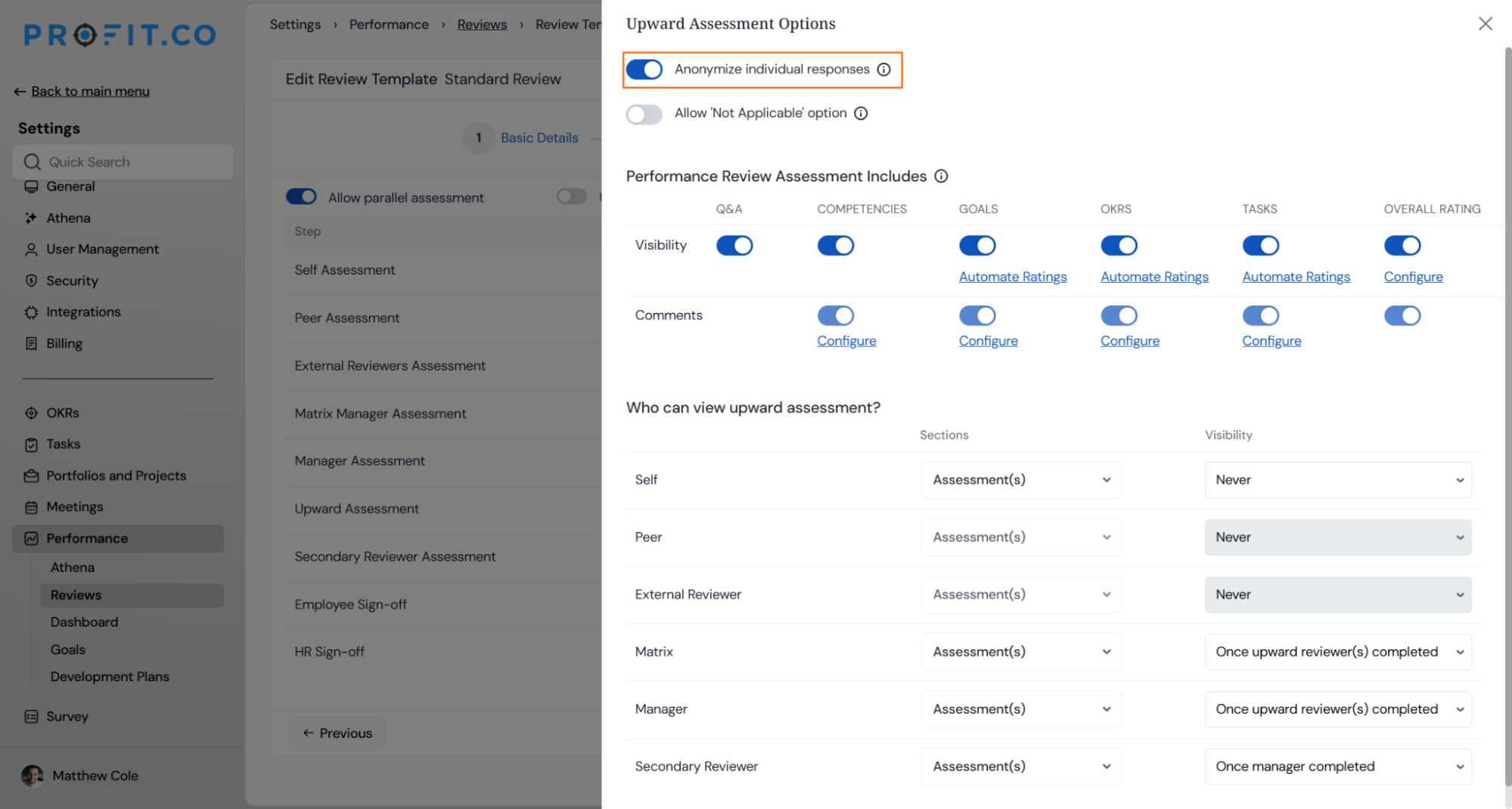
- Toggle Anonymize Individual Responses on to hide subordinate identities from assessment results.
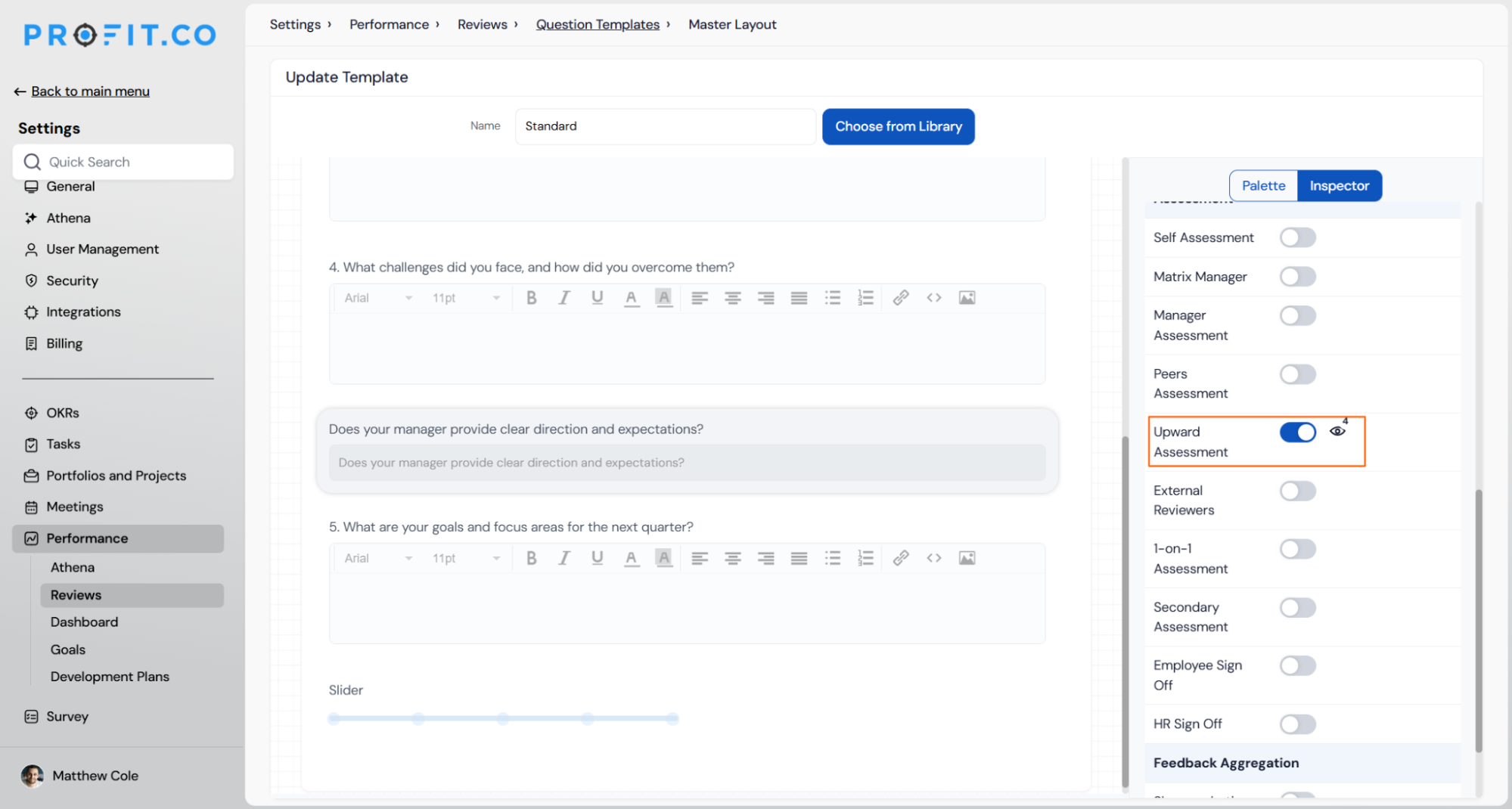
- Open the question template linked to the review.
- Mark the specific questions that should appear in the upward review.
Tip
Mark a distinct set of questions for upward review so direct reports answer questions suited to evaluating a manager, separate from the self-assessment or peer-assessment question sets.
Complete and View Upward Assessment
Step 2
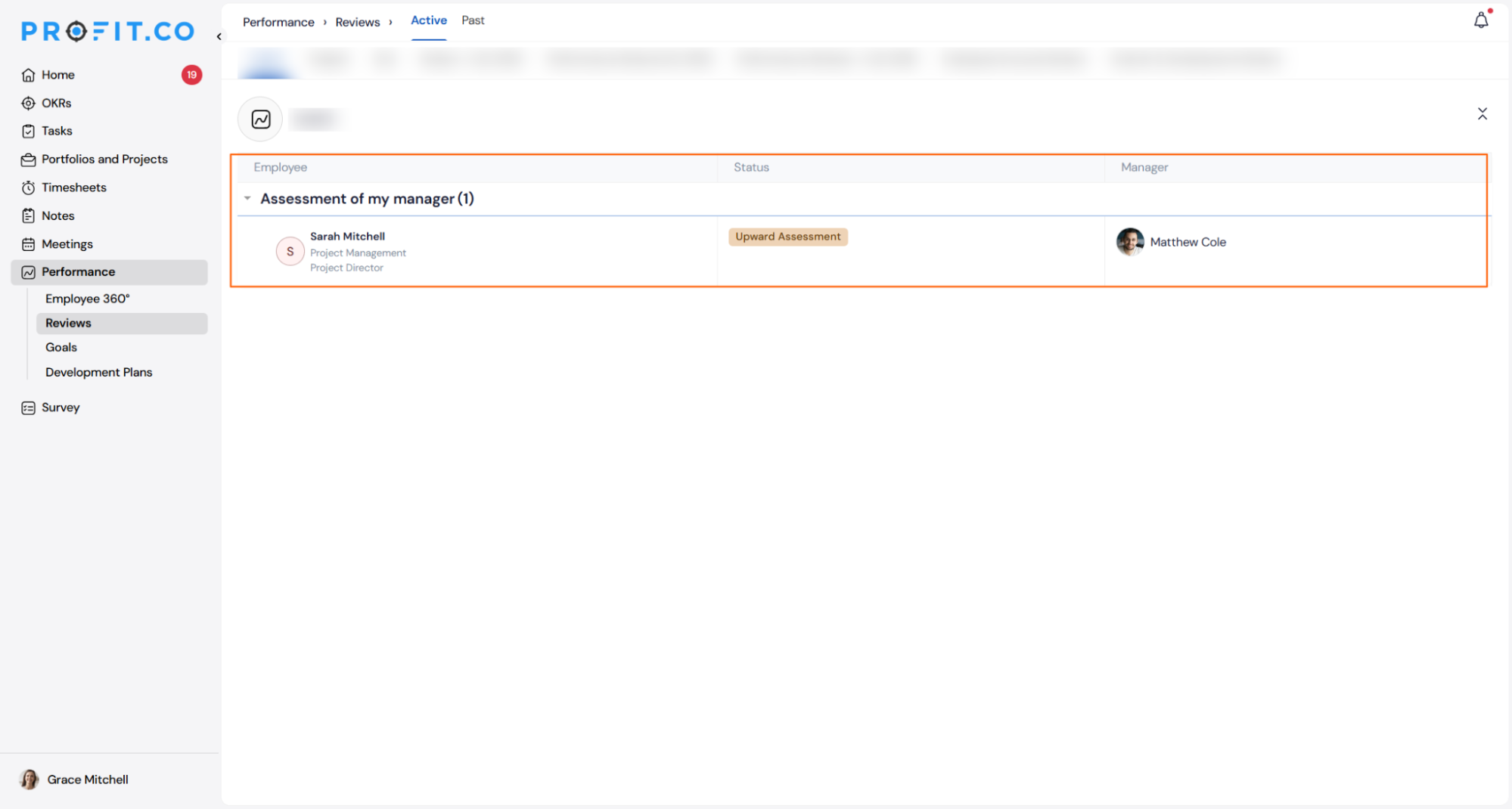
- Open the Assessment of My Manager section on the Reviews page once the review is initiated.
- Answer the assigned upward review questions.
Step 3
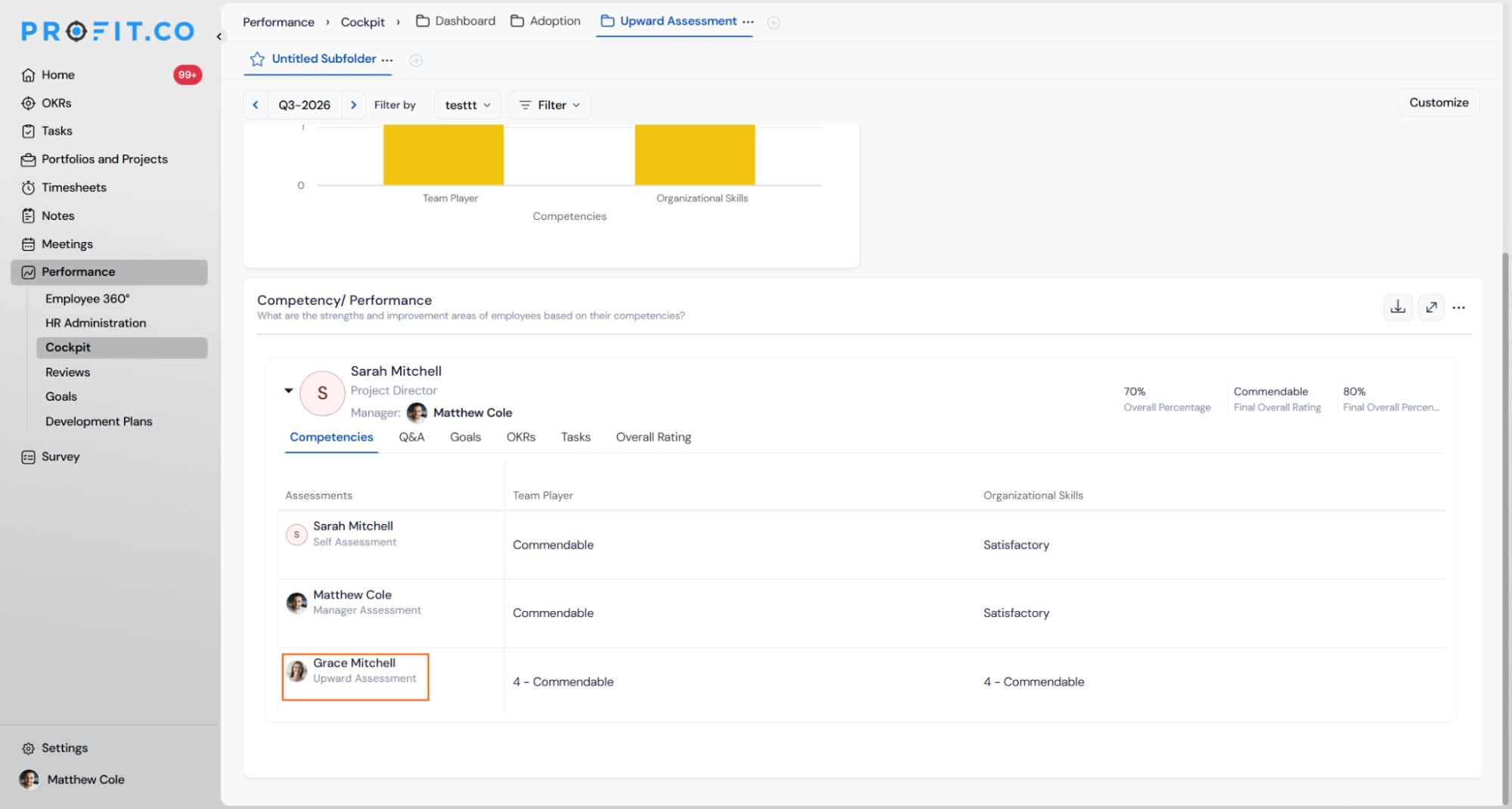
- Navigate to Performance → Cockpit.
- Open the Upward Assessment tab.
- Review all assessor scores side by side.
Upward Assessment Scenarios and Their Outcomes
| Scenario | What Happens |
|---|---|
| You enable Anonymize Individual Responses for a review template. | Profit.co hides individual subordinate identities from the assessment results, and the manager and HR see only the resulting scores and ratings without attribution. |
| You submit your upward assessment responses as a direct report. | Profit.co feeds the submitted responses into the manager's final overall rating, and the same responses factor into the manager's competency scores. |
| You start an upward assessment without submitting it. | Profit.co saves your in-progress response as a draft, and you can return to the assessment later to complete and submit it. |
| You reopen a review after a direct report has already submitted their upward assessment. | Profit.co applies the same reopen and activity log controls used for every other review step, and the previously submitted response carries forward under those controls. |
| You review upward assessment results in the Cockpit as HR. | Profit.co lists every assessor's score under the dedicated Upward Assessment tab, and upward assessment results appear side by side with self, manager, and peer scores. |
Permission Requirements
Only Super Users can enable, configure, or edit the Upward Assessment step within a review template, including the Anonymize Individual Responses toggle and question visibility settings.
Direct reports and managers do not need elevated permissions to complete or view their own upward assessment responses.
Best Practices for Upward Assessment
- Decide on Anonymize Individual Responses before the review cycle starts, since the setting determines whether HR and managers see individually attributed responses or masked scores for that entire cycle.
- Mark only the questions relevant to evaluating a manager in the upward review question set, since subordinates should not answer questions written for self or peer assessment context.
- Rely on the review's standard reopen and activity log controls to handle late upward submissions instead of following up manually, since reopening a review preserves previously submitted responses under those same controls.
- Treat the Cockpit's Upward Assessment tab as the single source for reviewing subordinate feedback on a manager, since it already lists upward scores side by side with self, peer, and manager assessments.
- Remind direct reports that an incomplete upward assessment is saved as a draft automatically, so there is no need to ask them to restart an assessment they left unfinished.
Related Articles
- How to create Q&A templates for the performance review?
- What are Ratings in the Review Summary Information?
- How do I initiate a Review?
Frequently Asked Questions
Upward Assessment is configured at the review template level, so you can enable it for one template, such as Standard Review, while leaving it off for others.
With anonymization off, the manager and HR see each direct report's response tied to their name instead of a masked score.
Yes. Within the question template, questions are marked as visible for upward review independently of what is shown in the self, peer, or manager assessment sections.
No. Upward Assessment follows the same initiation process as every other assessment type already defined in the review template.
Execute your strategy with confidence
Connect OKRs, tasks, and teams in one place with Profit.co
